Posts

XRDP installation on Ubuntu

XRDP is a Remote Desktop Protocol (RDP) Server, allowing RDP clients to be presented an X windows desktop to the user. Open the terminal and run the following command sudo apt-get install xrdp

Recent Items on the Start menu

Image
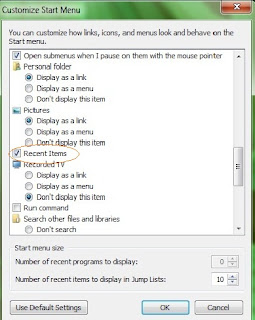
Right click the Start /Win button, select Properties Click the Start Menu tab (it should be select as default) Click the Customize button Scroll down and check the Recent Items  check box Click Ok Click Apply Click Ok 

How To Hide Folders In Ubuntu

Just put a dot before the folder name you want to hide. .folder     It is very simple

Solved Open Office asking for document recovery everytime

Is your open office asking for document recovery every time ? if your document doesn’t exist then also ? If Yes, then follow this document to solve your problem. Follow below steps to solve your problem :- To solve this problem :- For root :- Go to Terminal -> cd .openoffice.org/ /user/registry/ data/org/openoffice/Office/ There you will find Recovery.xcu [root@raghav Office]# ls Common.xcu Histories.xcu Linguistic.xcu Recovery.xcu Views.xcu Writer.xcu Remove Recovery.xcu Now try to open it will not ask you for recovery. For User :- Go to Terminal -> cd /home/ /.openoffice.org/ /user/registry/data/org/openoffice/Office/ There you will find Recovery.xcu [ub@raghav Office]# ls Common.xcu Histories.xcu Linguistic.xcu Recovery.xcu Views.xcu Writer.xcu Remove Recovery.xcu Now try to open it will not ask you for recovery. Let us know its work for you or not. Enjoy Open Source :)

How to install Partition Editor (GParted)

Open a terminal window and type in: sudo apt-get install gparted After that you can find GParted in the Gnome menu under System ->Administration ->Partition Editor

How to Remove Unneeded Fonts in Ubuntu

I really appreciate the fact that Ubuntu comes ready to use in multiple languages; the fact that Ubuntu and Linux in general serve an international community is one of my favorite things about the operating system. That being said, I don’t need a lot of the fonts that come in the basic install of Ubuntu, especially the ones with Arabic and Asian characters. While looking for a way to safely and easily remove these unneeded fonts in Ubuntu, I came across this thread at LaunchPad, advising the following command in a terminal: sudo apt-get remove ttf-kochi-mincho ttf-kochi-gothic ttf-arabeyes ttf-arphic-ukai ttf-arphic-uming ttf-baekmuk ttf-bengali-fonts ttf-devanagari-fonts ttf-gentium ttf-gujarati-fonts ttf-indic-fonts ttf-kannada-fonts ttf-kochi-gothic ttf-lao ttf-malayalam-fonts ttf-mgopen ttf-oriya-fonts ttf-punjabi-fonts ttf-tamil-fonts ttf-telugu-fonts ttf-thai-tlwg ttf-unfonts-core ttf-indic-fonts-core ttf-wqy-zenhei This worked excellently as a way to remove unneeded fonts in Ubu...

5 Steps to Setup User and Group Disk Quota on Linux

On Linux, you can setup disk quota using one of the following methods: * File system base disk quota allocation * User or group based disk quota allocation On the user or group based quota, following are three important factors to consider: * Hard limit – For example, if you specify 2GB as hard limit, user will not be able to create new files after 2GB * Soft limit – For example, if you specify 1GB as soft limit, user will get a warning message “disk quota exceeded”, once they reach 1GB limit. But, they’ll still be able to create new files until they reach the hard limit * Grace Period – For example, if you specify 10 days as a grace period, after user reach their hard limit, they would be allowed additional 10 days to create new files. In that time period, they should try to get back to the quota limit. 1. Enable quota check on filesystem First, you should specify which filesystem are allowed for quota check. Modify the /etc/fstab, and add the keyword usrquota and grpqu...
Ubuntu: Find Out Default Gateway

How do I find out default gateway IP address (default router IP assigned) for my Ubuntu Linux systems? Use the route or ip command to get default routing table for Ubuntu Linux. Open the terminal and type the following command: # route -n Sample outputs: Kernel IP routing table Destination Gateway Genmask Flags Metric Ref Use Iface 192.168.1.0 0.0.0.0 255.255.255.0 U 1 0 0 eth0 169.254.0.0 0.0.0.0 255.255.0.0 U 1000 0 0 eth0 0.0.0.0 192.168.1.1 0.0.0.0 UG 0 0 0 eth0 Destination for 0.0.0.0 is set to 192.168.1.1 via wlan0 interface i.e. 192.168.1.1 is default gateway. If you just type the route command with the -n switch it show word default instead of 0.0.0.0: route Destination Gateway Genmask Flags Metric Ref Use Iface 192.168.1.0 * 255.255.255.0 U 1 0 0 eth0 link-local * 255.255.0.0 U ...

Set the Default Browser and Email Client in Ubuntu

Image
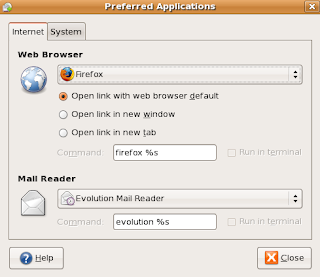
Ubuntu has a simple way to configure the default browser and mail client. Of course, Firefox is the default application for web browsing, so you shouldn’t ever need to use this screen, but if you insist, here’s how to do it. Navigate to System \ Preferences \ Preferred Applications Here you can specify which application you want to use for web or email links. For instance, if you are using Thunderbird for email instead of evolution, you can change that setting here.

Explains: UNIX / IT Sys Admin L1, L2, and L3 Support Levels

W hat is the definition of L1, L2 and L3 UNIX / Linux / IT support? What is the meaning of L1,L2 and L3 IT support? What is level of support for sys admin jobs? Generally L1, L2, and L3 support apply to any form of technical support such as mobile phones, electronics devices, computers, servers, and networking devices. All levels have different meanings and differ slightly from company to company and IT support groups. Basically, each person working at each level must have more experience and education in the field of support than its previous level. L1 is nothing but Level 1 support which is provided by a call center support person or engineer. L1 tech usually follows certain steps to solve the problem. In other words L1 will ask you various questions and some sort of software will be used to map your answers to further questions. L1 support takes your requests using the telephone, email or chat sessions. This kind of support engineers are are trained on the product with limited exp...

Ubuntu Equivalent of IPconfig

Easily view the network settings in Ubuntu, along the lines of the windows ipconfig /all command. The problem is that there is not one command in Ubuntu as all encompassing as the windows IPconfig command. So here is a list of various ubuntu commands that are equivalent to the various options of IPconfig. To view basic network settings: Windows: ipconfig Ubuntu: ifconfig To renew your network settings: Windows:ipconfig /release then ipconfig /renew Ubuntu: sudo dhclient To view your gateway: Windows:ipconfig /all Ubuntu: sudo route look for "default" To view your DNS settings: Windows:ipconfig /all Ubuntu: cat /etc/resolv.conf

Backing Up Data In Ubuntu Using sBackup

Image
In Ubuntu, it is surprisingly easy to backup your data. Gone are the days that require you to remember all the text line commands to type in the command prompt. With sBackup, you can easily backup your data with few clicks of your mouse. let me show you how. First, install sbackup sudo apt-get install sbackup After installed, two new entries will be found under System > Administration > Simple Backup Config, and Simple Backup Restore. Simple Backup Config is used to create or amend the backup job, while Simple Backup Restore is used after the disaster has occurred to restore the fil es . when you open "Simple Backup GUI" it will look like this: Under the General tab, there are three ways you can choose to backup your data: Use recommended backup setting Use custom backup setting Manual backups only If you are plain lazy and just to click, save and let it run by itself, you should choose the “recommended backup setting” . This will do a full backup every week and daily ...

Install anything in Ubuntu!

Having problem in installing anything in your Ubuntu OS.Take the terminal and issue the two commands that you can use are: sudo apt-get install PACKAGE and sudo aptitude install PACKAGE eg: For installing ssh server you have to issue sudo apt-get install ssh The sudo part of the command means you temporarily grant super-user/administrator rights to the command, provided you supply a correct user password It’s also possible to search from the command-line like it is in Synaptic. Try this: apt-cache search PACKAGE or aptitude search PACKAGE To find several packages related to what we’re looking for, together with brief descriptions apt-cache show PACKAGETo uninstall a package: sudo apt-get remove PACKAGE and sudo aptitude remove PACKAGE Removing configuration files as well: sudo apt-get remove –purge PACKAGE and sudo aptitude purge PACKAGE or sudo dpkg –purge remove PACKAGE

Scan to PDF using gscan2pdf in Ubuntu

Image
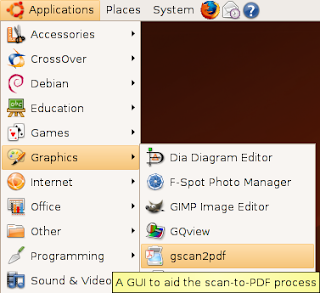
A GUI to ease the process of producing a multipage PDF from a scan. gscan2pdf should work on almost any Linux/BSD machine. Install gscan2pdf in Ubuntu You need to edit the /etc/apt/sources.list sudo vi /etc/apt/sources.list add the following line save the file and exit deb http://gscan2pdf.sourceforge.net/download/debian binary/ Now you need to update the source list with the following comamnd sudo apt-get update install gscan2pdf with the following command sudo apt-get install gscan2pdf This will install all the required packages. If you want to open gscan2pdf go to Applications--->Graphics--->gscan2pdf

Howto: Shutdown Linux Box Automatically

You may wonder - why should I shutdown the Linux box automatically? It depends upon your situation. For example, you are downloading couple of tar balls and you want to go home early. You can schedule a job to shutdown Linux after downloading is completed. Linux/UNIX/BSD/OS X comes with at and cron commands to automate task. Almost all common task can be automated using at command. Common Tasks For at Command 1. Shutdown/reboot the system 2. Email yourself files 3. Send birthday remainders Commands * at- Execute a task at a specific time. For example, shutdown computer, send birthday remainder etc. Useful to schedule one job at a time or a single future event. * cron – If you want to shutdown Linux box automatically everyday 8 pm then you need to use cron instead of at command (see below for examples). Useful to schedule recurring events or daily events such as backup data, or check system security etc. at Command Examples Let us see how to shutdow a Linux automatically at...

How to change computer name in Ubuntu

Computer name is normally given during the OS installing phases. But you could easily change the computer name with a simple GUI tool which is there in Ubuntu by default.There is a command line tool as well if you are so particular.GUI tool is simple and easy to use.Here is a step by step guide on how to change the computer name. Using GUI * Go to System -> Administration -> Networking * Network settings General Tab -> Host Settings -> Hostname: Specify the computer name * save changes and restart your computer. Using command line * Goto terminal and type the following sudo gedit /etc/hostname * Change your hostname Also take a look at /etc/hosts. And change your old name to your new one too.

How To Set A Static IP On Ubuntu 8.10

Due to a bug if you want to assign a static IP on Ubuntu 8.10 Desktop your setting will be overwritten after the next reboot because of a bug Solution Solution is to get down and dirty with the command line, it takes less than 2 minutes. Edit /etc/network/interfaces and enter the following values. sudo nano /etc/network/interfaces # The primary network interface auto eth0 iface eth0 inet static address 192.168.1.51 network 192.168.1.0 netmask 255.255.255.0 broadcast 192.168.1.255 gateway 192.168.1.1 And save it. Now move on to edit the /etc/resolv.conf. And add the name server. sudo gedit /etc/resolv.conf nameserver 192.168.1.1 If you don’t want to reboot the system restart the networking service instead. sudo /etc/init.d/networking restart

Installing Indian Rupee font in Ubuntu & Debian Linux

1) Download the font from Foradian Technologies blog. 2) Open a terminal & enter the following commands with root privileges/root user, mkdir /usr/share/fonts/ttf cp Rupee_Foradian.ttf /usr/share/fonts/ttf apt-get install ttmkfdir cd /usr/share/fonts/ttf ttmkfdir > fonts.scale mkfontdir cd /usr/share/fonts/ttf/ chmod 644 /usr/share/fonts/ttf/Rupee_Foradian.ttf 3) To insert the font in your document, type grave ascent(`) key, the one above tab key. You should have the new rupee symbol in your document. That’s it. Enjoy.............. :)

How to find your Linux Kernel Version.

Checking your Linux Kernel Version: Once your up and running with your favorite Linux distribution , you might find the need to install additional software packages or drivers. Some of these software applications or drivers can be specific to a Linux Kernel version in which case you will need to find this information. Finding the Kernel Version, Release information and Operating System from a running system is fairly straight forward and can be done directly from a terminal. Locating your Linux Kernel Version: Open up a terminal and type one of the following commands listed in bold text. uname -a prints all information uname -r prints the kernel release uname -v prints the kernel version uname -o prints the operating system

GShutdown – Schedule System Shutdown In Ubuntu

Image
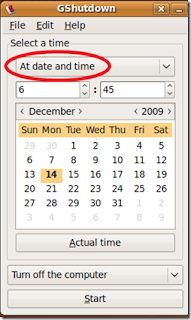
We have covered many tools which perform or schedule system shutdown in Windows, WinDown and Shutdown Agent are two examples. GShutdown is a tool for Ubuntu which performs and schedules system shutdown and restart. In order to install this application, open the terminal and run the following command: sudo apt-get install gshutdown Once the installation is completed, go to the Applications->Accessories->Gshutdown to launch it. Specify the time to shutdown or restart your computer and hit the Start button. You will find its icon located in the system tray (Known as Panel in Linux) for faster access. It works on Gnome, KDE and XCF desktop environments. Enjoy!