Posts

Solved Open Office asking for document recovery everytime

Is your open office asking for document recovery every time ? if your document doesn’t exist then also ? If Yes, then follow this document to solve your problem. Follow below steps to solve your problem :- To solve this problem :- For root :- Go to Terminal -> cd .openoffice.org/ /user/registry/ data/org/openoffice/Office/ There you will find Recovery.xcu [root@raghav Office]# ls Common.xcu Histories.xcu Linguistic.xcu Recovery.xcu Views.xcu Writer.xcu Remove Recovery.xcu Now try to open it will not ask you for recovery. For User :- Go to Terminal -> cd /home/ /.openoffice.org/ /user/registry/data/org/openoffice/Office/ There you will find Recovery.xcu [ub@raghav Office]# ls Common.xcu Histories.xcu Linguistic.xcu Recovery.xcu Views.xcu Writer.xcu Remove Recovery.xcu Now try to open it will not ask you for recovery. Let us know its work for you or not. Enjoy Open Source :)
How to install Partition Editor (GParted)

Open a terminal window and type in: sudo apt-get install gparted After that you can find GParted in the Gnome menu under System ->Administration ->Partition Editor

How to Remove Unneeded Fonts in Ubuntu

I really appreciate the fact that Ubuntu comes ready to use in multiple languages; the fact that Ubuntu and Linux in general serve an international community is one of my favorite things about the operating system. That being said, I don’t need a lot of the fonts that come in the basic install of Ubuntu, especially the ones with Arabic and Asian characters. While looking for a way to safely and easily remove these unneeded fonts in Ubuntu, I came across this thread at LaunchPad, advising the following command in a terminal: sudo apt-get remove ttf-kochi-mincho ttf-kochi-gothic ttf-arabeyes ttf-arphic-ukai ttf-arphic-uming ttf-baekmuk ttf-bengali-fonts ttf-devanagari-fonts ttf-gentium ttf-gujarati-fonts ttf-indic-fonts ttf-kannada-fonts ttf-kochi-gothic ttf-lao ttf-malayalam-fonts ttf-mgopen ttf-oriya-fonts ttf-punjabi-fonts ttf-tamil-fonts ttf-telugu-fonts ttf-thai-tlwg ttf-unfonts-core ttf-indic-fonts-core ttf-wqy-zenhei This worked excellently as a way to remove unneeded fonts in Ubu...

5 Steps to Setup User and Group Disk Quota on Linux

On Linux, you can setup disk quota using one of the following methods: * File system base disk quota allocation * User or group based disk quota allocation On the user or group based quota, following are three important factors to consider: * Hard limit – For example, if you specify 2GB as hard limit, user will not be able to create new files after 2GB * Soft limit – For example, if you specify 1GB as soft limit, user will get a warning message “disk quota exceeded”, once they reach 1GB limit. But, they’ll still be able to create new files until they reach the hard limit * Grace Period – For example, if you specify 10 days as a grace period, after user reach their hard limit, they would be allowed additional 10 days to create new files. In that time period, they should try to get back to the quota limit. 1. Enable quota check on filesystem First, you should specify which filesystem are allowed for quota check. Modify the /etc/fstab, and add the keyword usrquota and grpqu...

Ubuntu: Find Out Default Gateway

How do I find out default gateway IP address (default router IP assigned) for my Ubuntu Linux systems? Use the route or ip command to get default routing table for Ubuntu Linux. Open the terminal and type the following command: # route -n Sample outputs: Kernel IP routing table Destination Gateway Genmask Flags Metric Ref Use Iface 192.168.1.0 0.0.0.0 255.255.255.0 U 1 0 0 eth0 169.254.0.0 0.0.0.0 255.255.0.0 U 1000 0 0 eth0 0.0.0.0 192.168.1.1 0.0.0.0 UG 0 0 0 eth0 Destination for 0.0.0.0 is set to 192.168.1.1 via wlan0 interface i.e. 192.168.1.1 is default gateway. If you just type the route command with the -n switch it show word default instead of 0.0.0.0: route Destination Gateway Genmask Flags Metric Ref Use Iface 192.168.1.0 * 255.255.255.0 U 1 0 0 eth0 link-local * 255.255.0.0 U ...

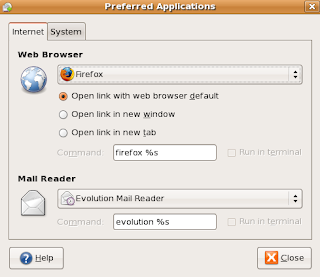
Set the Default Browser and Email Client in Ubuntu

Image
Ubuntu has a simple way to configure the default browser and mail client. Of course, Firefox is the default application for web browsing, so you shouldn’t ever need to use this screen, but if you insist, here’s how to do it. Navigate to System \ Preferences \ Preferred Applications Here you can specify which application you want to use for web or email links. For instance, if you are using Thunderbird for email instead of evolution, you can change that setting here.

Explains: UNIX / IT Sys Admin L1, L2, and L3 Support Levels

W hat is the definition of L1, L2 and L3 UNIX / Linux / IT support? What is the meaning of L1,L2 and L3 IT support? What is level of support for sys admin jobs? Generally L1, L2, and L3 support apply to any form of technical support such as mobile phones, electronics devices, computers, servers, and networking devices. All levels have different meanings and differ slightly from company to company and IT support groups. Basically, each person working at each level must have more experience and education in the field of support than its previous level. L1 is nothing but Level 1 support which is provided by a call center support person or engineer. L1 tech usually follows certain steps to solve the problem. In other words L1 will ask you various questions and some sort of software will be used to map your answers to further questions. L1 support takes your requests using the telephone, email or chat sessions. This kind of support engineers are are trained on the product with limited exp...